
Ask Cody
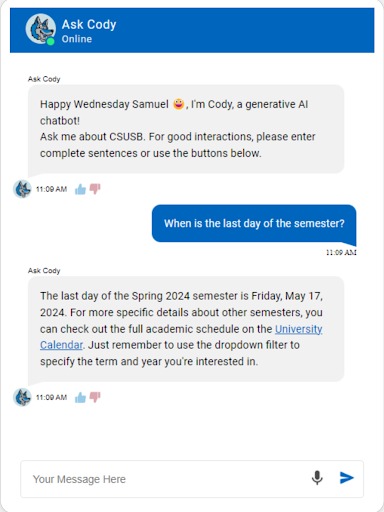
Ask Cody isn’t just some FAQ bot. He’s more than just a basic web search tool. He's a next-generation conversational assistant powered by the latest generative AI technology. By drawing knowledge from various CSUSB websites and databases, Ask Cody offers human-like, quality responses to questions about admissions, financial aid, parking, and other campus resources. His vast knowledge base allows him to provide accurate, meaningful answers, making him an essential resource for the students, faculty, and staff. Since Cody operates 24/7, he can provide assistance to students even when campus is closed. Additionally, by handling repetitive questions often asked through calls and email, staff in student-facing offices can spend more time focusing on more nuanced, individual situations.
History
CSUSB began exploring conversational AI in 2017 by developing a chatbot that could answer questions about student and class statistics through Actions on Google. The first practical campus application followed in 2018 with a web-based chatbot built with Google Dialogflow that answered financial aid questions. When the COVID-19 pandemic began in March 2020, the chatbot team rapidly developed additional assistants for Admissions, the Registrar, Parking, and more.
Then in July 2022, the team successfully unified all the department-specific chatbots into a single Dialogflow mega-agent, containing over 700 hand-built responses and lookups. This mega-agent was rebranded as “Ask Cody”. At the same time, the team began experimenting with OpenAI’s API to see how generative LLMs could move Cody away from handcrafted Dialogflow responses. The team discovered foundational methods such as Retrieval-Augmented Generation (RAG) in order to keep GPT responses grounded in real-time data sourced directly from the University.
From November 2023 into 2024, this new version of Ask Cody gradually replaced the existing chatbots across the CSUSB website. Then in March 2024, we had our biggest milestone: adding Cody to the myCoyote portal. Placing Cody within the portal made it possible to provide limited contextual information about authenticated users, such as their campus roles and affiliations. This allowed Cody to search for more relevant information and provide answers better suited to an individual user’s circumstances.
This version of Cody also marked the team’s full transition away from using Dialogflow as the source of his responses. Instead, Cody began generating responses using knowledge bases built from CSUSB website content indexed through Google Vertex AI.
Since January 2026, Cody has been given the ability to make individual tool calls, and over time has been allowed to retrieve selected information from PeopleSoft when needed to further personalize conversations through the myCoyote portal. As Cody gains access to additional, carefully selected information, he will be better able to provide relevant guidance throughout each student’s individual journey.
What Cody Knows
In total, Cody has four layers of knowledge, with each layer building upon the previous. These layers are our campus website, select campus databases, personal information from myCoyote, and select information from PeopleSoft (the system behind the Student Center).
Websites
Using Google’s Discovery Engine, Ask Cody can utilize content from our campus website and related domains. We start by providing Discovery Engine with definitions that identify which websites/pages should be included or excluded. Discovery Engine then determines which URLs fall under those definitions, ingests copies of Google’s indexed information about those pages, and stores that information within a Discovery Engine data store.
Behind the scenes, these data stores use vector embeddings to organize and retrieve website content based on its semantic meaning. You can read more about vector embeddings from either Google Cloud or OpenAI, but conceptually vector embeddings work like this:
- A piece of content (text, a PDF, a webpage, or another supported format) is prepared for processing. Larger pieces of content are divided into smaller chunks.
- Each chunk is processed by an embedding model, which transforms it into a vector: a long list of numbers representing the content’s semantic meaning across hundreds or thousands of dimensions.
- These vectors are stored in a searchable index alongside references to their original content. Repeating this process for every chunk creates a vector index representing the entire collection or database.
- When Cody looks for information from the website, he can pose a question to Discovery Engine, which converts the question into a vector. That vector is then compared with all the stored vectors in the database to identify content with the most closely related meaning.
- The original content associated with the strongest vectors is given to Cody to use as the basis for his response.
In this way, Discovery Engine’s data stores function as vector databases that Cody can search based on semantic meaning. This allows him to find the most relevant content based on both the user’s word choice and the underlying meaning of their question. Almost every response Cody provides is based on website content.
Databases
Using Google BigQuery, we store several collections of campus information:
- Academic Programs
- Campus Directory Information
- Class Schedule
- Events
- University Calendar
This information is then preprocessed so that it can be imported into Discovery Engine as another data store. Once indexed, the information is handled in much the same way as our website content and is used in conjunction with our web data to answer questions
Personal Information: myCoyote
When someone authenticates into myCoyote and opens the chatbot, Cody will know a little bit of information about the user to facilitate a more personalized experience. Cody does not receive unrestricted access to a database of user information, as this runs the risk of him using information he shouldn’t have access to. Instead, myCoyote sends Cody a small package of specific information that can be used as additional context. This information package includes:
- The user’s name and ID
- Roles and affiliations (undergraduate, graduate, international, etc.)
- Degree Information
- GPA Information
- Advisors
- Assigned Registration dates
- Expected term of graduation (if a grad check is on file)
- (WIP) Tuition Balance Information
This information is helpful when a student is asking questions about their own personal information, or is asking a question where the student’s specific roles and details would change the response. (Admissions processes, eligibility information, etc).
Personal Information: PeopleSoft (Student Center)
In addition to the information provided by myCoyote, Cody also has the ability to retrieve specific information from PeopleSoft. Cody does not have unrestricted access to entire PeopleSoft tables. Instead, he can make controlled requests for specific data points using the user ID passed forward by the authenticated myCoyote session.
Cody is currently allowed to pull:
- A student’s class schedule
- A student’s to-do list
- A student’s holds
- (WIP) An Applicant’s application status/information.
- (WIP) A student’s Financial Aid Information
In both cases, Cody itself is never in control of whose data he has access to, or how much of it. Cody is only ever allowed to request for X information, and it is our platforms and programming that determines whose data he receives, and which data to give.
How you can help Cody
While the chatbot team is always reviewing conversations and looking for ways to make Cody better, there are ways you can help our efforts as well!
Web Editors: Since Cody relies heavily on website information to ground most of its answers, the state of every campus website is very important. Please make sure that all of your web pages are up-to-date. This includes the page’s content, any hyperlinks you include, and any calendar dates or hours. Please also be sure that you are not duplicating content that exists elsewhere, such as copying information from a different department’s website onto your own. Only describe information that belongs to your department or for which you are the authoritative source. Any external content should be referenced via hyperlinks to the appropriate department’s web page.
Departments: Anyone affiliated with a campus department can log in to the Ask Cody Dashboard to view the real-time conversations that are associated with their department. You can also act as a live agent, generate and download reports, manage your team, and more. The most important part of the dashboard, however, is the interaction evaluation process. Using our evaluation form, you can see what steps Cody took to answer a question, including what webpages he used and what text was specifically found. Through these processes Cody and our dashboard have proven to be especially effective at identifying the ways that your website can be modified to better serve your web audience. To get started and receive training on how to evaluate department-related questions, you can contact Samuel Jacuinde.
Lastly, we have a feedback form available for individuals to leave specific comments and questions regarding the campus chatbot. Feel free to fill it out, and if you’d like a further discussion into how it works and what you can do to help improve it, we’re more than happy to meet with you!
The Current Team
David Vasilia
Lead Chatbot Architect
Samuel Jacuinde
Chatbot Communication Developer
Sagar Patil
Dashboard Developer
Fabian Torres
Student Evaluator
Mia Gigena
Student Evaluator
Where To Find Cody on the Web
- Academic Advising
- Academic Success and Undergraduate Advising
- Campus Directory
- Career Center
- Class Schedule
- Commencement
- Financial Aid and Scholarships
- ITS (Technology Support Center)
- Join the Pack
- Orientation
- Palm Desert Campus
- Parking
- Registrar
- Risk Management
- SSO Login Page
- Student Financial Services
- University Calendar
Disclaimer
Clearly, Ask Cody uses generative AI technology to formulate final responses to users. While the chatbot team has gone to great lengths to make sure each response is backed by factual data, no genAI technology is perfect, and Cody can make mistakes. The chatbot team continuously evaluates interactions to find ways to improve performance and quality, but please be sure to consider verifying important information before acting on it. Please also be aware that your conversations with Ask Cody on the website and through myCoyote are archived for purposes of improving response quality and user experience. Conversations conducted through public websites are anonymous, while those conducted through myCoyote are associated with authenticated users.
