When to Use a Payment Request Form
Payment Requests are submitted through Optimize, CSUSB’s ServiceNow-based platform. A Payment Request Form must be completed and submitted with all required supporting documentation before Accounts Payable can review and process the request.
Payment Requests may be used for eligible non-PO expenses when the vendor does not accept payment by Universal Card/ProCard or when the expense otherwise qualifies for payment through this process. The Payment Request Matrix identifies the types of expenses that may be submitted using the Payment Request form.
Before committing your department to a purchase, review the Payment Request Matrix to confirm that the expense is eligible.
Whenever allowable, departments should use a Universal Card as the first payment option. Universal Card payments are generally faster and more cost-effective than issuing a check.
For instructions on completing and submitting the form, see the Payment Request Form Step-by-Step Guide under Helpful Tools & Resources.
Additional Submission Requirements
Payments to new vendors may be delayed or denied until Accounts Payable receives a properly completed Payee Data Record (Form 204) from the vendor.
If an order form, application, or other document must be mailed with the payment, the request must include a comment identifying this requirement. The requesting department is responsible for accurately completing and updating all forms or applications before submitting the request.
Invoices, order forms, and applications must identify the University or its auxiliaries as the billing party, include the University address as the delivery address, and identify the contact name and department responsible for placing the order. The requesting department is responsible for providing the vendor with all information necessary for proper delivery and resolving any issues related to the order.
Unapproved, non-qualifying, or incomplete Payment Requests will be returned to the originating department with an explanation of why the request could not be processed.
Hospitality Expenses
Hospitality expenses that are allowable under the Payment Request form may be submitted using one of the form’s hospitality payment types. A separate Hospitality Worksheet is no longer required. Requestors must provide the required hospitality information and supporting documentation within the Payment Request form.
For additional requirements, please review the Hospitality webpage.
Payment Request Workflow
Payment Request Forms are currently completed and submitted through Optimize, CSUSB’s ServiceNow-based platform.
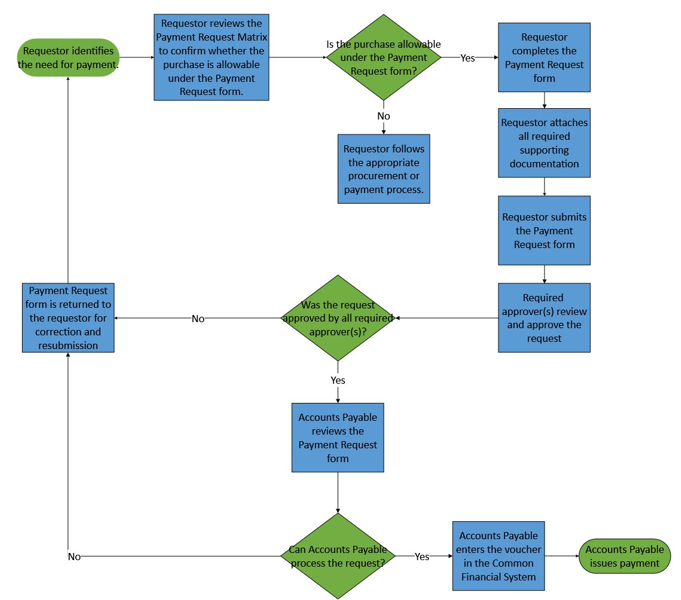
- Requestor identifies the need for payment.
- Requestor reviews the Payment Request Matrix to confirm whether the purchase is allowable under the Payment Request form.
- Is the purchase allowable under the Payment Request form?
- Yes: Requestor completes the Payment Request form.
- No: Requestor follows the appropriate procurement or payment process.
- Requestor completes the Payment Request Form
- Requestor attaches all required supporting documentation
- Requestor submits the Payment Request form
- Required approver(s) review and approve the request
- Was the request approved by all required approver(s)?
- Yes: Continue to Accounts Payable review (9)
- No: Payment Request form is returned to the requestor for correction and resubmission
- Accounts Payable reviews the Payment Request form
- Can Accounts Payable process the request?
- Yes: Continue to voucher entry (11)
- No: Payment Request form is returned to the requestor for correction and resubmission
- Accounts Payable enters the voucher in the Common Financial System
- Accounts Payable issues payment
Payment Request form Training and Open Sessions
Training sessions provide an overview of the Payment Request Form, including how to determine when it may be used, how to complete and submit the form, where to find the required supporting documentation for each payment request type, and the approval and Accounts Payable review process.
Open question sessions provide an opportunity for participants to ask follow-up questions and clarify any remaining concerns after attending a training session. These sessions are not intended to replace the formal training.
Training and open question session dates and times are listed below and will be updated as additional sessions are scheduled.
All sessions will be held VIRTUALLY, via Zoom. Zoom link will be provided via CSULearn registration confirmation email under 'Notes'.
Register via CSULearn by searching "Payment Request Form: Submission and Approval Training" in the library, or with direct link.
For questions or accommodation requests, please contact the Staff Development & Enrichment Center at (909) 537-3125 or sde@csusb.edu. Accommodation requests must be received at least 72 business hours before the event.
Training Schedule
Tuesday, November 3, 2026 - 11:00AM-12:00PM
Thursday, November 5, 2026 - 2:00PM-3:00PM
Tuesday, November 10, 2026 - 11:00AM-12:00PM
Thursday, November 12, 2026 - 2:00PM-3:00PM
Tuesday, November 17, 2026 - 11:00AM-12:00PM
Thursday, November 19, 2026 - 2:00PM-3:00PM
Tuesday, November 24, 2026 - 11:00AM-12:00PM
Open Session Schedule and Zoom Link
Join any of the meetings below by clicking on the following button at the listed date and time: Open Session Zoom Link ->
Tuesday, November 10, 2026 - 4:00PM-4:30PM
Thursday, November 12, 2026 - 4:00PM-4:30PM
Tuesday, November 17, 2026 - 4:00PM-4:30PM
Thursday, November 19, 2026 - 4:00PM-4:30PM
Tuesday, November 24, 2026 - 4:00PM-4:30PM
Join any of the meetings below by clicking on the following button at the listed date and time: Open Session Zoom Link ->
Tuesday, December 1, 2026 - 4:00PM-4:30PM
Thursday, December 3, 2026 - 4:00PM-4:30PM
Tuesday, December 8, 2026 - 4:00PM-4:30PM
Thursday, December 10, 2026 - 4:00PM-4:30PM
Thursday, December 17, 2026 - 4:00PM-4:30PM
Helpful Tools & Resources
- Payment Request Form User Guide: Provides instructions for accessing, completing, submitting, approving, and tracking Payment Requests in Optimize. It also explains supporting documentation requirements, expense allocations, approval workflows, hospitality payment requirements, and how to correct and resubmit returned requests.